Downloads
Tagged 'Hud' ordered randomly

FloatingX is a modern, minimal HUD for Marathon 2 and Infinity, inspired by the XBLA Durandal interface. Art by TychoVII, scripting by Hopper.
Notes for version 1.4.1:
This version fixes a bug under Aleph One 1.1, and works with Visual Mode.lua.
3,383 downloads, 5 reviews, 3 screenshots, 4.8 rating
Trojan Fullscreen Corner HUD 1.2
jamos05 on 09/16/2020

This is a version of the Fullscreen Corner HUD that is made to work with Trojan in Aleph One. It moves the HUD to the lower left corner of the screen and allows for fullscreen mode without any black bar.
The HUD graphics are from the M2 port of Trojan, which doesn't take up the full screen like the original does.
Notes for version 1.2:
Removed the alternative shapes file since the gap happens even without my fullscreen plugin.
1,552 downloads, 0 reviews, 4 screenshots
M2 Default HUD 1.1
Hopper on 01/17/2023

Are you working on a Lua HUD, and want to know how to draw inventory panels or weapons just like the built-in one? This plugin acts just like the hardcoded HUD from M2 and Infinity, so you can see how to duplicate any feature in Lua. It works with third-party scenarios too.
Notes for version 1.1:
Version 1.1 fixes errors with the network radar, and hides ammo for a second weapon when you only have one.
2,924 downloads, 0 reviews, 1 screenshot
BallsHUD 1.0
W'rkncacnter on 04/01/2015
The perfect HUD for those of you who like to stare at balls while you play.
2,555 downloads, 0 reviews, 0 screenshots
Widescreen Marathon 2/Infinity Default HUD 1.1
Trov on 03/28/2024
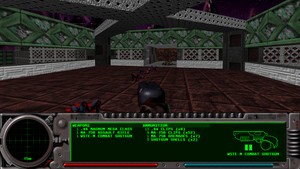
This is the default HUD for Marathon 2 & Marathon Infinity, extended to fill today's modern 16:9 screens when using "largest" HUD size mode. This plugin can be used with both Marathon 2 & Infinity.
A second inventory page is displayed to fill the new space. In Solo games, the extra page always shows Ammunition. In Netgames, the extra page always shows the Scoreboard.
Additionally, the 3D game view is no longer letterboxed.
Normal, Double, and Largest HUD sizes are all supported.
Lastly, this also fixes a couple small issues the original HUD had:
-
SMG/Fusion pistol item & ammo names are no longer cut off since now we have a bit more horizontal space
-
Yellow/Purple shield bars now don't have gray corners when overlapping the bar under it
-
Motion tracker graphic not as dithered as before, so it stands out less compared to the regular background
Note that due to custom graphics this is not compatible with custom scenarios that replace the HUD.
Based on the "M2 Default HUD" Lua by Hopper
This will not work with M1. I may later make a wide adaptation of the M1A1 HUD for those who want this kind of HUD in M1. Widescreen Marathon 1 Classic HUD here.
Notes for version 1.1:
v1.1: Fixed shield/oxygen bars being drawn a tiny bit too low
v1.0: Initial release
394 downloads, 0 reviews, 5 screenshots
Original Mac Fonts (Marathon 2/Infinity) 1.0
OpenRift on 12/02/2022

This mod restores the original fonts used in the Macintosh version of Marathon.
NOTE: This only works with the DEFAULT HUD, custom HUDs have been reported to have issues with this plugin, so experiment at your own risk.
Notes for version 1.0:
v1.0 - Initial Release
605 downloads, 0 reviews, 1 screenshot
Fullscreen Corner HUD 1.1
Shappie on 05/07/2024

This is a slightly modified version of Hopper's M2 Default HUD. It moves the HUD to the lower left corner of the screen and allows for fullscreen mode without any black bar. This works for any non-M1 scenario.
Thanks to wrkncacnter for the additional scripting.
Notes for version 1.1:
Fixed margins so the lua console can be viewed. Thanks to Terin in the Marathon Discord for fixing this!
1,844 downloads, 5 reviews, 5 screenshots, 5.0 rating
Hi-Res Floating HUD for Rubicon-X 1.1
thedoctor45 on 08/24/2014

This is a heavily modified version of the XBLA Rubicon HUD that was posted by Nobility some time ago: http://simplici7y.com/items/xbla-rubicon-hud
The interface graphics have been replaced with proper ones from the old Rubicon HUD and all the weapon graphics have been recreated in HD.
Go check it out.
Notes for version 1.1:
• Replaced interface graphics with proper ones from the old Rubicon HUD • Weapon graphics have been recreated in HD.
3,137 downloads, 3 reviews, 5 screenshots, 5.0 rating

This is a basic fullscreen HUD for any scenario that uses the default Marathon 2 or Infinity HUD, and doesn't come with its own HUD. It attempts to make as few assumptions as possible, which allows it to work on a wide variety of scenarios, but is a little ugly. See the screenshots for details.
Software mode works but is even uglier due to the inability to circle clip the motion sensor.
Normal/Double/Largest preference is supported, but the plugin will try not to cover too much of the weapons. Double isn't enabled until 2k, and Largest is really only useful at 4k.
Based on the Default HUD script by Hopper.
To install, create a Plugins directory next to the Scripts directory in the scenario you want to add it to, and copy this zip file to the Plugins directory.
Notes for version 1.2:
Changes:
- Supports normal/double/largest preference
1,487 downloads, 1 review, 4 screenshots, 5.0 rating
M1A1 Fullscreen Corner HUD 1.1
Shappie on 05/07/2024

This is a slightly modified version of Hopper's M1A1 HUD. It moves the HUD to the lower left corner of the screen and allows for fullscreen mode without any black bar. This should work for any Aleph One scenario, including M1.
I also made a few small edits to the HUD itself for aesthetics and transparency.
Thanks to wrkncacnter for the additional scripting.
Notes for version 1.1:
Fixed margins so the lua console can be viewed. Thanks to Terin in the Marathon Discord for fixing this!
1,726 downloads, 1 review, 4 screenshots, 5.0 rating
Basic M1 HUD 1.2
treellama on 05/01/2024

This is a basic fullscreen HUD for the original Classic Marathon. It also works with TROJAN. It is very minimalist, see the screenshots for details.
Software mode works but the square motion sensor will not be clipped out.
All three HUD sizes are supported, but the plugin will not cause the HUD to cover too much of weapons. Basically, Double doesn't work until 2k, and Largest isn't really useful until 4K.
To install, copy this into the Plugins directory in your Classic Marathon install.
Notes for version 1.2:
Changes:
- Better normal/double/largest support
178 downloads, 0 reviews, 2 screenshots
Trojan M2 HUD 1.0
jamos05 on 10/07/2020

Port of the Trojan M2 HUD to work with the latest release of Trojan for Aleph One. Fills the screen more than the original M1 HUD, but not as much as the Trojan Fullscreen HUD.
Note that there is a known issue with the Alien weapon not connecting to the right side of the screen. See https://github.com/Aleph-One-Marathon/alephone/issues/222
Notes for version 1.0:
1.0 -- Original release
1,341 downloads, 0 reviews, 2 screenshots
Original Mac Fonts (Marathon 1) 1.0
OpenRift on 12/02/2022

This mod restores the original fonts used in the Macintosh version of Marathon.
NOTE: This only works with the DEFAULT HUD, custom HUDs have been reported to have issues with this plugin, so experiment at your own risk.
Notes for version 1.0:
v1.0 - Initial Release
558 downloads, 0 reviews, 1 screenshot
FloatingXHUD M1A1 (ultimate version) 1.0
DADDY Z3RO on 02/21/2011

There have been a few renditions of a FloatingX for M1A1, but non of them looked like they belonged in the actual game of Marathon.
This version matches the interface of the real game, and has the same floaty goodness of FloatingX.
The screenshots are actually from Legend, and the version i captured is slightly out of date, so there may be some very very minor differences.
Finally, The Health and Oxygen bars are misaligned by one pixel... Because of this small margin, I cannot correct it. And yes, I have tried.
Notes for version 1.0:
Released
3,275 downloads, 2 reviews, 1 screenshot, 4.0 rating
Enhanced HUD for Eternal X 1.0.1
fiddler_on_a_roof on 04/06/2013

This is a modification of Hopper's XBLA HUD for Marathon 2 and Infinity, this time designed for Eternal X.
Notes for version 1.0.1:
Fusion pistols are rotated correctly and look better.
2,650 downloads, 1 review, 5 screenshots, 5.0 rating
FloatingXHUDv1.3 fix for M1A1 1.0
Zaero on 10/27/2010

This simple mod will allow you to play the M1A1 scenerio with proper weapon display when FloatingX hud is used.
Notes for version 1.0:
First release
2,438 downloads, 0 reviews, 1 screenshot
Marathon Classic HUD 1.0
Hopper on 07/07/2012

The original Marathon game interface, ported to Aleph One as a Lua HUD.
Notes for version 1.0:
After three years, the first project I ever started in Aleph One is complete. Happy Bungie Day.
3,803 downloads, 7 reviews, 2 screenshots, 4.9 rating
Widescreen Marathon 1 Classic HUD 1.1
Trov on 03/27/2024

This is the classic Marathon 1 HUD, but modified to take the edge off just a little bit by extending it to fill modern 16:9 displays. For best results use 'Largest' HUD size in options.
With the extra space, an additional inventory page is displayed. In solo games, the extra page shows Ammunition at all times. In netgames, the extra page shows the Scoreboard at all times.
Based on the Classic M1 HUD plugin posted here by Hopper.
Wide Marathon 2 & Marathon Infinity HUD here.
Notes for version 1.1:
1.1 - Add extra inventory page to fill extra space (Ammo in solo, scoreboard in netgame)
1.0 - Initial release
376 downloads, 1 review, 2 screenshots, 5.0 rating
XBLA HUD Plugin 1.1
Hopper on 02/23/2014

This plugin is a port of the Durandal XBLA interface to Aleph One. Compatible with Marathon 2 and Infinity, and included in the all-in-one downloads of those games.
Notes for version 1.1:
Added support for Visual Mode.lua. This version was included with all-in-one downloads of Aleph One 1.1.
3,569 downloads, 1 review, 1 screenshot, 5.0 rating
Trojan HUDs Pack 1.0
President People on 07/20/2012

Once again building off Hopper's Marathon Classic HUD, the Trojan HUDs Pack both brings the classic Trojan interface to M1A1 (Trojan HUD with M1 weapon graphics, colored radar blips), and provides the full vanilla Trojan interface in preparation for the eventual coming of M1 support. (Eventually. Though it currently works well with the Trojan Legacy Sampler!)
Who says Trojan is dead?
Notes for version 1.0:
Initial Release
